eecs270.org
Projects Overview
Project Timeline
| Project | Due | Signoff |
|---|---|---|
| 0: Majority (Tutorial) | N/A | N/A |
| 1: Selector | Jan 20 | Lab |
| 2A: Robbie / 2B: Renee | Jan 30 | Lab |
| 3: Combinational Calculator | Feb 11 | Lab |
| 4: Timing and Delay | Feb 25 | Lab |
| 5: Up-Down Counter | Mar 11 | N/A |
| 6: Traffic Light Controller | Apr 1 | Lab |
| 7: Sequential Calculator | Apr 10 / Apr 20 | N/A |
DE2-115 FPGA Development Board
In this class, you will be using the DE2-115 FPGA development board to implement and test your digital circuit designs. The DE2-115 board features an Altera Cyclone IV E EP4CE115F29C7N FPGA and several memory components and peripherals. In the projects, you will primarily interface with the FPGA, switches, buttons, LEDs, and seven-segment displays.
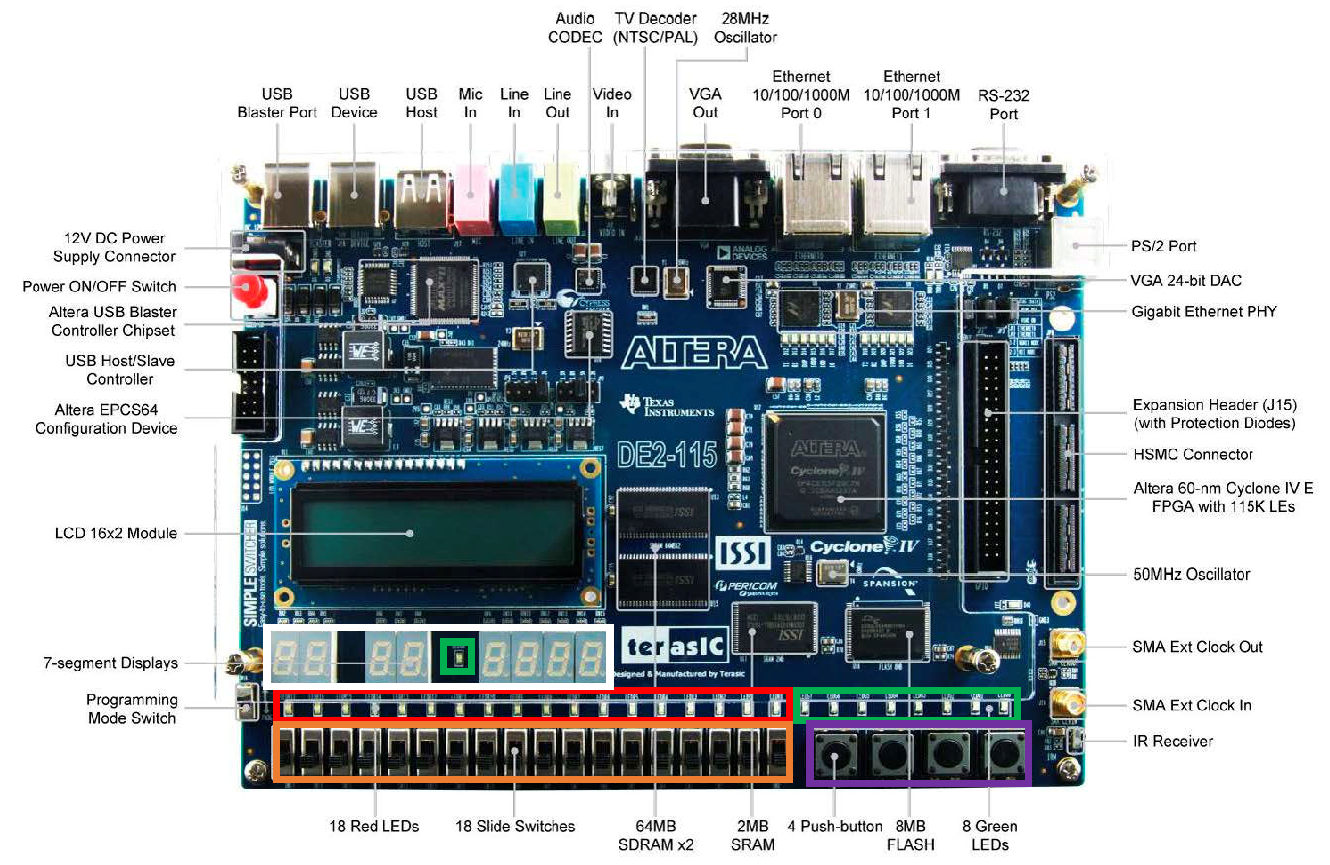
The components that you will be using most frequently in the projects are summarized in the table below:
| Component | Standard Name | Active High/Low |
|---|---|---|
| Slider Switches | SW[17:0] | High |
| Push-Button Keys | KEY[3:0] | Low |
| Red LEDs | LEDR[17:0] | High |
| Green LEDs | LEDG[8:0] | High |
| HEX Displays | HEX7[6:0], …, HEX0[6:0] | Low |
| 50 MHz Clock | CLOCK_50 | N/A |
Project Work Flow
High Level Design
The most important step in any logic design project is planning. Before you start coding, make sure to create a high-level design of your circuit. This includes creating block diagrams, state diagrams (for sequential designs), and truth tables (for combinational designs). A well-thought-out design will make the coding and testing phases much easier. Debugging in hardware is extremely time consuming. The more time spent in planning, the easier any debugging will be.
Verilog Coding
Once you have a solid high-level design, you should begin coding it in Verilog. To ensure ease of debugging, follow best practices for Verilog coding. This includes:
- Abstraction though submodules
- Testbenches
- Meaningful module and signal names
- Grouping of similar assignments
- Consistent formatting and indentation
- Clear and concise comments
ModelSim Simulation
To verify that your design works as intended, you should simulate your code using a testbench and ModelSim. While this may seem redundant with the Autograder and LabsLand, simulation becomes exponentially more important as designs become more complex. Simulation is a great way to quickly test a large number of edge cases and track bugs down to the source.
Using ModelSim in earlier projects will help you immensely in debugging Project 6 and 7. Additionally, learning to effectively use simulators is extremely important in future courses such as EECS 427 and EECS 470.
See the ModelSim Quick Start for step-by-step setup. Prefer to work locally instead of on CAEN? See the Local Simulation Tool Installation Guide for setting up iverilog, gtkwave, and VaporView on WSL, macOS, or Linux.
LabsLand Testing
Once your design passes simulation, you should upload it to LabsLand to ensure that your interface is working correctly with the DE2-115 board. Generally, if your design passes simulation, it will work correctly on the board. Common mistakes that cause designs to fail on the board include incorrect naming of I/O pins, confusing active high/low signals, and timing issues.
See the LabsLand Verification Guide for step-by-step instructions.
Autograder Submission
After testing your design thoroughly, you can submit to the Autograder for evaluation. You are allowed 3 submissions to the Autograder per day. This resets at midnight each day.
Evaluation Process
Autograder Design Tests
These tests evaluate the correctness of your design. They include a variety of test cases that check regular cases and edge cases.
Autograder Mutation Tests
These tests evaluate the efficacy of your testbench. They check whether your testbench can catch common errors in the project.
In-person Signoff
These tests evaluate whether your design works correctly on the DE2-115 board. You will demonstrate your design to your lab instructor during lab sessions. You do not need to prepare anything for the in-person signoffs; the lab instructor will pull your highest graded Autograder submission for evaluation during lab.
CAEN VNC Setup
Tools like ModelSim and Quartus require access to a CAEN lab machine. These can either be accessed in person, or remotely using VNC. Instructions for setting up VNC access to CAEN lab machines can be found here. For further instructions, please refer to Project 0.
Note: CAEN machines support both Windows and Linux. However, in this course, you will need to use Windows to run Quartus and ModelSim.